


For many businesses, customer information lives in fragments.
Marketing runs campaigns from one platform. Sales tracks conversations somewhere else. Customer service keeps their own notes in yet another system. Each team has useful data, but the organisation never sees the full picture.
As businesses grow, this fragmentation becomes harder to manage. Leads fall through the cracks. Conversations get repeated. Teams make decisions without access to the full context of a relationship.
This is exactly the problem Customer Relationship Management platforms were designed to solve.
HubSpot CRM was built around a simple idea. Instead of separating marketing, sales and service tools, it brings them all together inside one system where every interaction becomes a part of a single customer journey.
When implemented well, HubSpot becomes far more than a contact database. It becomes a shared operational environment where teams understand what customers are doing, what they need next and how different departments contribute to the relationship.
For organisations trying to scale relationships rather than simply manage contacts, this kind of visibility can fundamentally change how the business operates.
HubSpot CRM connects every stage of the customer journey inside one platform.
Instead of using separate tools for marketing, sales and customer service, HubSpot brings these activities together around a shared database.
At a high level, the system operates through four connected layers.
Every contact and company record lives inside a shared CRM database.
This record captures the complete history of the relationship, including marketing engagement, sales conversations, support requests and purchases.
Different teams operate through specialised hubs built on top of the same CRM data.
Because these hubs share the same data, information flows naturally between departments.
HubSpot automates repetitive tasks using workflows.
For example:
• Assigning new leads to the appropriate sales representative
• Sending follow-up emails after a form submission
• Notifying teams when important customer activity occurs
Automation ensures processes run consistently without manual effort.
HubSpot connects activity across marketing, sales and service to produce unified reporting.
Leadership teams can see:
• Which campaigns generate revenue
• How opportunities move through the pipeline
• Which customers are most engaged
• Where growth opportunities exist
Together, these capabilities transform HubSpot from a simple CRM database into a connected operational system.

Lorem ipsum dolor sit amet, consectetur adipiscing elit, sed do eiusmod tempor incididunt ut labore et dolore magna aliqua. Ut enim ad minim veniam, quis nostrud exercitation ullamco laboris nisi ut aliquip ex ea commodo consequat. Duis aute irure dolor in reprehenderit in voluptate velit esse cillum dolore eu fugiat nulla pariatur.
At its core, HubSpot CRM is designed to track and organise every interaction a business has with prospects and customers.
Each contact record contains a timeline that captures the entire relationship.
This timeline might include:
• Website visits and content downloads
• Email engagement and campaign interactions
• Sales conversations and meeting notes
• Deal progression and proposals
• Service tickets and support conversations
Instead of information being scattered across systems, everything connects within a single platform.
This unified view allows teams across the organisation to understand the full context of every relationship.
HubSpot therefore, becomes more than a CRM.
It becomes the operational centre of customer relationships.
Before platforms such as HubSpot existed, businesses relied heavily on disconnected tools.
Each department understood its own activities but struggled to see how those activities connected to the broader customer journey.
HubSpot addresses this problem by acting as a shared source of truth.
Imagine a prospect downloads a guide from your website on Monday.
On Tuesday, they return and read two blog articles.
On Thursday, they request a meeting.
In many businesses, those signals live in three different systems.
In HubSpot, they appear together on a single timeline attached to the contact record.
Sales teams can immediately see what content the prospect engaged with.
Marketing can see which campaigns generate real opportunities.
This visibility dramatically reduces internal friction and helps teams respond faster to genuine customer behaviour.
One of the defining characteristics of HubSpot is its modular structure.
Instead of operating as one large system, HubSpot is organised into specialised hubs that support different stages of the customer lifecycle.
All hubs share the same underlying CRM database, allowing information to flow seamlessly across teams.
Marketing Hub changes how marketing teams understand their impact on revenue.
In many organisations, marketing and sales operate in separate systems. Marketers generate leads but rarely see how their work contributes to deals.
HubSpot closes that gap.
When a prospect engages with content, downloads resources or registers for an event, those interactions become a part of the contact record.
Sales teams can see exactly how a prospect discovered the business and what content influenced their interest.
Over time, this visibility allows marketing teams to move from measuring activity to measuring pipeline contribution.
That shift fundamentally changes how marketing operates.
Sales Hub provides the structure sales teams need to manage complex relationships and long sales cycles.
Many organisations still track opportunities in spreadsheets or scattered notes. This makes it difficult to understand which deals are progressing and which are quietly stalling.
HubSpot replaces that uncertainty with a structured pipeline.
Each opportunity moves through defined stages such as discovery, proposal, negotiation and close.
Every email, meeting and task connected to the opportunity is recorded automatically.
For sales leaders, this visibility improves forecasting and pipeline management.
Instead of relying on intuition, they can analyse stage progression, deal velocity and historical win rates.
The sales process becomes organised rather than reactive.
Service Hub allows organisations to deliver consistent customer support while maintaining visibility across the relationship.
Support teams can see the full history of a customer before responding to issues.
This includes previous purchases, marketing interactions and sales conversations.
Instead of starting each support request from scratch, service teams operate with full context.
This improves response quality and strengthens long-term customer relationships.
Operations Hub focuses on data quality and system integration.
It allows businesses to synchronise data across tools, automate operational processes and maintain clean CRM records.
For organisations using multiple platforms, this hub plays a critical role in keeping systems aligned.
HubSpot also includes additional hubs that expand the platform’s capabilities.
Content Hub allows organisations to manage websites, blogs and digital content within the HubSpot ecosystem while connecting engagement directly to CRM data.
Commerce Hub supports quoting, payments and revenue-related processes inside the platform.
These hubs allow businesses to expand their CRM environment gradually as their needs evolve.
Despite the strength of the platform, HubSpot implementations sometimes fail when organisations treat the system as a quick installation rather than a structured rollout.
Implementing HubSpot can feel like buying a high-performance sports car.
The technology is powerful, but without proper setup and training, it risks becoming an expensive asset that never reaches its full potential.
One of the most common mistakes is importing messy data.
Duplicate records, inconsistent formatting and incomplete contact information can create long-term complications if not addressed early.
Another frequent issue involves overly complex automation.
Teams often build extremely complicated workflows with dozens of triggers and branches. When those workflows eventually break, troubleshooting becomes difficult.
Lifecycle stages can also create confusion when marketing and sales interpret them differently.
The technology works best when the underlying processes are clear.
For many organisations, the most valuable HubSpot features are those that reduce manual work while strengthening customer relationships.
Examples include:
• automated data enrichment that improves contact records
• meeting scheduling tools that eliminate email back and forth
• structured sales sequences for consistent follow-up
• lead scoring models that prioritise the most engaged prospects
• reusable templates and snippets that save time for sales teams
These capabilities allow teams to spend less time managing systems and more time engaging with customers.
One of HubSpot’s greatest strengths is its ability to function as a single source of truth across the organisation.
Because all hubs share the same CRM database, every department works from the same information.
Instead of fragmented systems and duplicate data, HubSpot creates a unified record of the entire customer lifecycle.
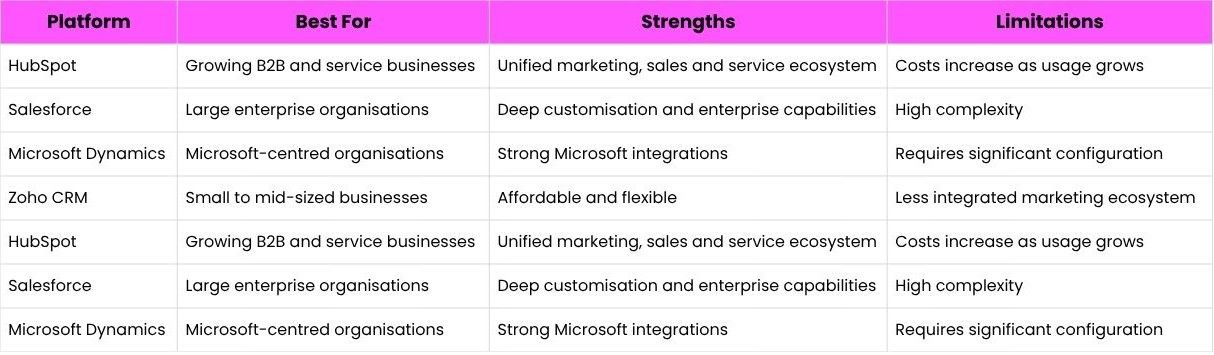
HubSpot’s key advantage is the tight integration between marketing, sales, and service within one platform.
HubSpot has invested heavily in artificial intelligence to enhance the platform.
Recent developments include:
• AI-powered content assistants
• Predictive lead scoring
• Automated data enrichment
• AI-driven reporting insights
• Conversational chat assistants
These capabilities reduce manual work and help teams focus on strategic activities rather than repetitive tasks.
As AI technology continues to evolve, CRM platforms like HubSpot are increasingly becoming intelligent systems that assist with both automation and decision-making.
Although HubSpot is powerful, it is not the right solution for every organisation.
Businesses with highly complex enterprise workflows sometimes require the deep customisation capabilities offered by platforms such as Salesforce.
Companies managing extremely large-scale operational environments may also prefer systems designed specifically for enterprise infrastructure.
HubSpot tends to perform best for organisations seeking alignment between marketing, sales, and service without the complexity of enterprise-level platforms.
Understanding this distinction helps organisations choose technology that fits their operating model.
When HubSpot is configured around clear processes, it becomes far more than a CRM database.
Marketing teams understand which campaigns generate meaningful opportunities.
Sales teams prioritise the prospects most likely to convert.
Service teams gain full visibility into customer history before responding to issues.
Leadership teams gain something equally valuable.
Clarity.
Clarity about how prospects become customers.
Clarity about which activities drive revenue.
Clarity about where growth opportunities exist.
When systems finally start talking to each other, organisations stop guessing and start understanding how relationships actually develop.
- HubSpot CRM connects marketing, sales, and service teams within one platform, allowing organisations to understand the entire customer journey.
- The platform replaces fragmented tools with a unified operational system where every interaction contributes to a shared customer timeline.
- HubSpot works particularly well for B2B and service-based organisations with complex relationships and longer sales cycles.
- Successful implementation depends on strategy, clean data, and clearly defined lifecycle stages.
- HubSpot’s modular hubs allow businesses to expand gradually as operational needs evolve.
- When implemented properly, HubSpot becomes far more than a CRM database. It becomes the operational centre of customer relationships and a powerful platform for growth.


Our Services


