

Managing your Facebook and Instagram presence properly requires more than simply adding someone as an admin to your page.
Whether your agency is creating content, running ads, responding to messages or managing reporting, the safest and most professional way to collaborate is through Meta Business Suite partner access.
This allows your agency to work on your accounts without needing your personal login details, while ensuring you still maintain ownership and control of your business assets.
In this guide, we’ll walk you through how to safely give your agency access to your Meta Business Portfolio.
Professional agencies should never ask for your personal Facebook password.
Instead, Meta allows businesses to securely share access through Business Portfolios. This gives agencies the permissions they need to manage your accounts while keeping ownership with your business.
Using partner access is:
Most importantly, your business remains the owner of all pages, ad accounts and assets.
Your agency is simply being granted permission to work on them.
Before setting up access, make sure you have:
If your agency has not yet provided their Business Portfolio ID, simply ask them for it before starting the process.
Log into your Meta Business Suite account and open the business portfolio connected to your business assets.
This is where your Facebook Pages, Instagram accounts, ad accounts and other Meta assets are managed.
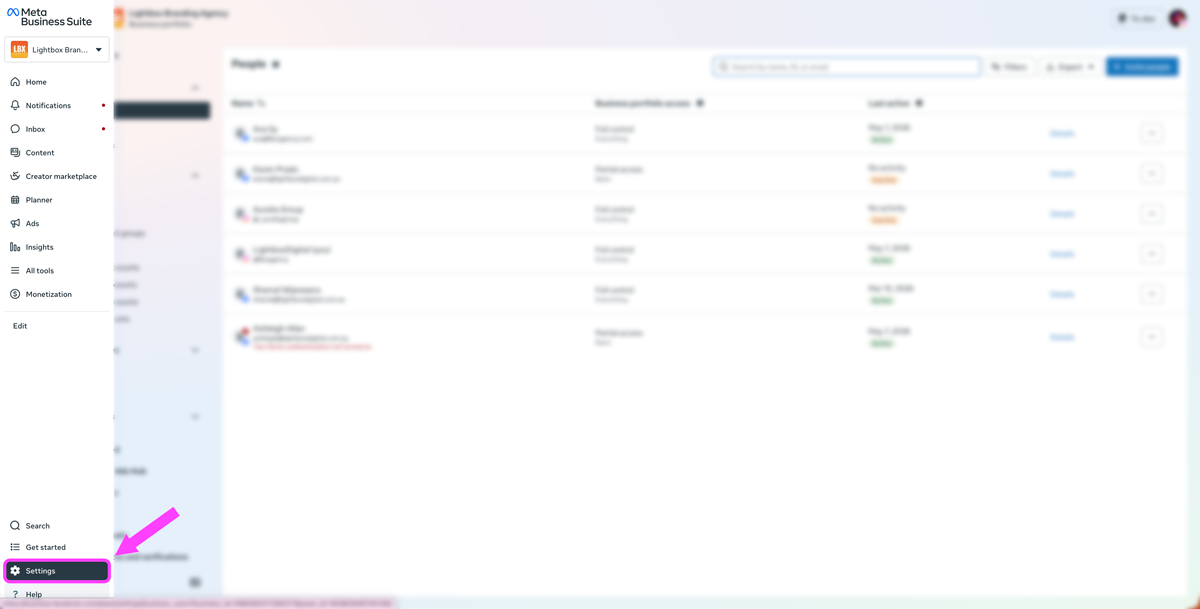
In the bottom left corner of Meta Business Suite, click:
Settings
This will open your Business Portfolio settings and permissions area.
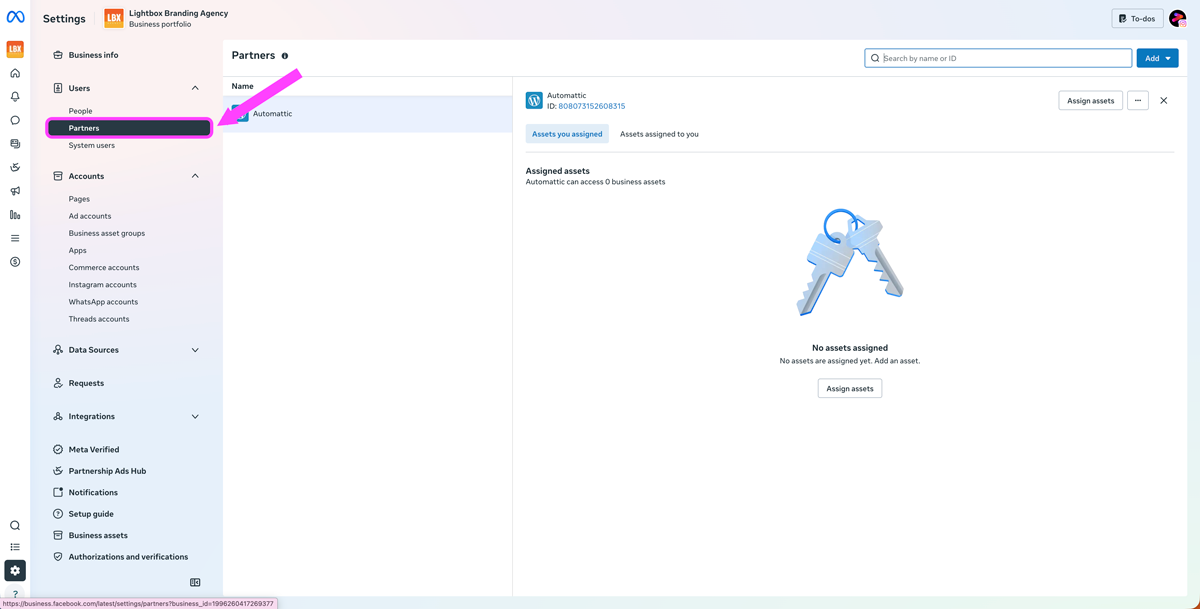
Inside the left-hand menu, locate the:
Users > Partners
section.
If you cannot see the Partners option, it usually means you do not currently have full control permissions for the Business Portfolio.
Only users with full control can assign partner access.
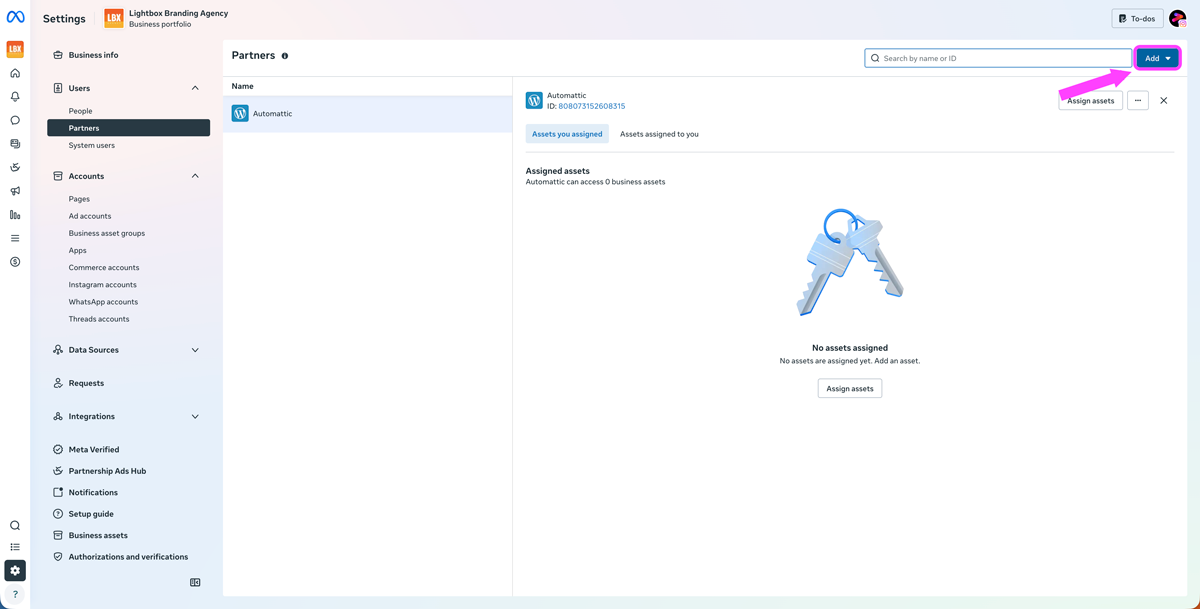
Click:
Add
Then select:
Give a partner access to your assets
This tells Meta that you want to share selected business assets with another business portfolio, such as your marketing agency.
Your agency will provide you with a Business Portfolio ID.
Enter this ID into the field provided and click:
Next
This connects your business portfolio to your agency’s business portfolio.
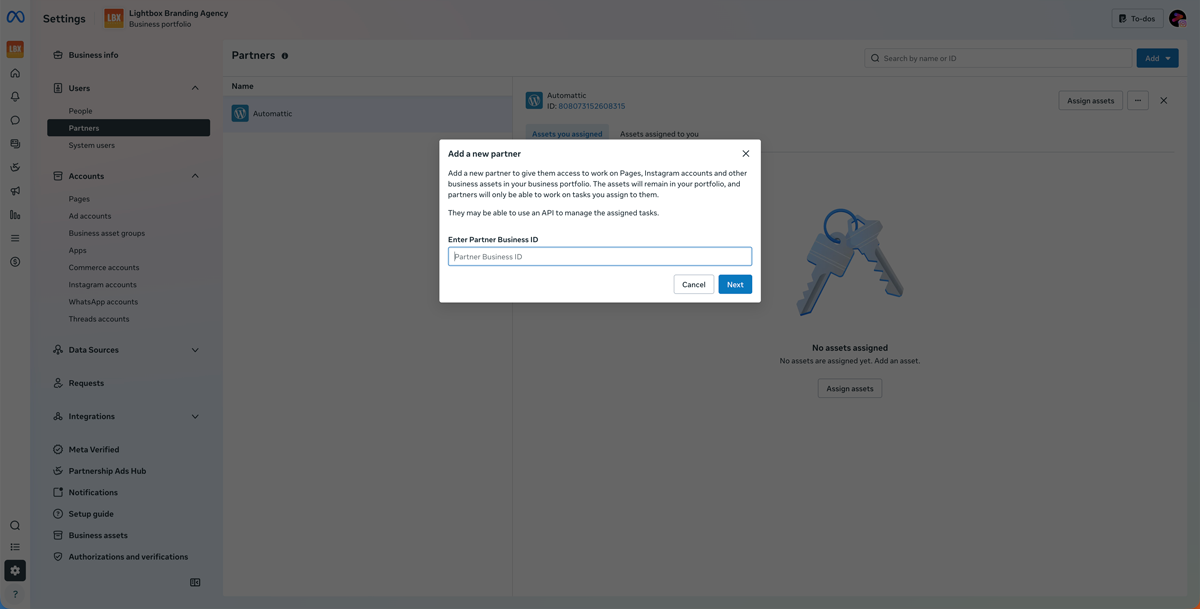
Next, Meta will ask which assets you would like your agency to access.
This may include:
Select only the assets your agency needs access to.
For most businesses, this will typically include:
Meta will now ask what level of access you would like to provide.
You can choose between:
Best for:
This allows your agency to complete specific tasks without giving broader administrative permissions.
Best for:
Even with full control, your business still owns the assets. Your agency cannot transfer ownership or share the assets with another business.
Once you have selected your assets and permissions, click:
Assign assets
Depending on your security settings, another admin with full control may need to approve the request.
Once approved, your agency will immediately be able to access the assigned assets through their own Meta Business Suite.
You may also need to provide your Business Portfolio ID to your agency in the future.
To find it:
This is a unique identifier for your business within Meta.
You likely do not have full control permissions for the Business Portfolio.
Another admin will need to either:
Meta now requires two-factor authentication for many Business Portfolio actions.
You’ll need to enable this before adding a partner.
Your Instagram account may not yet be properly connected to your Facebook Page or Business Portfolio.
This usually needs to be fixed before access can be assigned.
You can remove partner access at any time through the Partners section inside Meta Business Suite.
No. Your business remains the owner of all assets.
Your agency is only being granted permission to manage selected assets.
Yes. You can remove partner access at any time inside Meta Business Suite.
Yes. It is significantly safer and is the recommended approach from Meta.
It depends on the services being provided.
For content posting and community management, partial access is often enough.
For paid advertising, tracking and integrations, full control is usually required.
Without proper access, agencies cannot:
Setting up partner access correctly is one of the most important steps in creating a smooth working relationship with your agency.
It protects your business, improves security and gives your agency the tools they need to properly manage your marketing activities.
The process can feel technical at first, but once connected, it makes collaboration significantly easier and more secure moving forward.
Our team can guide you through the process during onboarding to ensure your Facebook, Instagram and advertising accounts are connected correctly and securely.
If you run into any issues during setup, feel free to contact the LBX Agency team for support.

Our Services


